Google
HOME / BB Store

NEW Brainy Betty Site! Intellipodcast allows you to create audio and video podcasts easily!


Explore all our partner sites!

Free Stuff for PowerPoint
Backgrounds
VIDEO for PowerPoint
Flash in PowerPoint
Music for PowerPoint
Tutorials, tips and tricks
PowerPoint utilities
Other PowerPoint goodies

Other Free Stuff
Word templates
Excel template
Publisher templates
Educators templates & more
Other free graphics stuff
Links to Premium Products
Enhancement suite for PowerPoint
Premium templates for PowerPoint
3D transitions for PowerPoint
Video backgrounds for PowerPoint
3D charts for PowerPoint
Custom presentations & templates
SWiSHmax - Flash creation tool
PowerPoint to Flash converter
Affordable suite of Flash tools for PowerPoint
2D text animation tool for PowerPoint
3D animation tool
3D text animation tool for websites and videos
PowerPoint remote controls
Portable speakers for PowerPoint
Website templates
Over 500,000 top-quality photos
Excel templates and add-ons
Outlook templates & enhancements
Corporate Information
FAQs
Contact Us
PowerPoint Tips Blog
Privacy Policy
Terms of Use 
Corporate News/ PR
System Requirements Note:
You’ll need PowerPoint version 2000 or up to use the Flash or animated templates.
You’ll also need an unzipping tool, as most of the freebies are in a zipped format.
 

More General Templates

Download: Girl Cartwheeling Download: Hitech Trelissed
Download: Elegant Curve Animated Download: Thunderbird Cafe
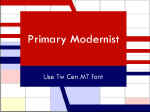
Download: Made in America  Download: Primary Modernist
Download: Teamwork Download: Corporate Statement
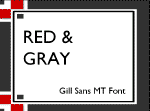
Download: Blue Galaxy Download: Red & Gray
Download: Aqua Blends Download: Industrial Grunge
Betty's Quick Microsoft® PowerPoint®  Tip:  In Microsoft PowerPoint 97 and 2000 you can "tear off" some submenus. These menus are identified by a bar at the top of the submenu. For example, to tear off the Action Buttons submenu, point to Action Buttons on the Slide Show menu, and then click and drag with your mouse the blue bar at the top of the submenu. The Action Buttons toolbar appears in the slide window.