Science Fair Backgrounds, Graphics and
Sounds
Sample Presentation:
Download here. (RIGHT
- Click with your mouse and choose
Save Target
As...)
Backgrounds for PowerPoint:
To download any graphic
to your computer, simply Right-click
with your mouse button and choose Save Picture As...
To Use in PowerPoint:
Open a new PowerPoint presentation. Go to the View
menu and choose Master and Slide Master.
Go to the Format menu now and choose Background.
Click the drop down box at the bottom. It looks like
this:
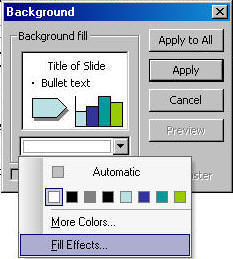
Choose Fill Effects...
Then choose the
Textures tab.
Click the "Other
Texture" button at the bottom of the dialog box.
Navigate to the place
where you saved the graphic above and choose it. Click
the OK button and then choose "Apply to All."
Graphics for Slides:
To download any graphic
to your computer, simply Right-click
with your mouse button and choose Save Picture As...
In PowerPoint: Choose
the Insert menu and choose Picture (Picture
from File...) to put it on a slide.
|
|
|
|
|
|
|
Microsoft ®
PowerPoint, Microsoft ® Word, Microsoft ® Outlook and Microsoft ® Excel are
registered trademarks of Microsoft Corporation in the United States and/or
other countries.
All other trademarks are the property of their respective
owners. All content on this site copyright
©
2013 Eclipse Digital Imaging - Owner, Brainy Betty, Inc. & its licensors. ALL RIGHTS
RESERVED. |